Which Pokémon have the most merch items?
Recently, a thought came to me: of the over 1000 Pokémon in existence, which of them have the most merch? Not in terms of popularity - because popularity ratings are arbitrary and can never really be trusted - but in terms of absolute number of products available for sale.
tl;dr: 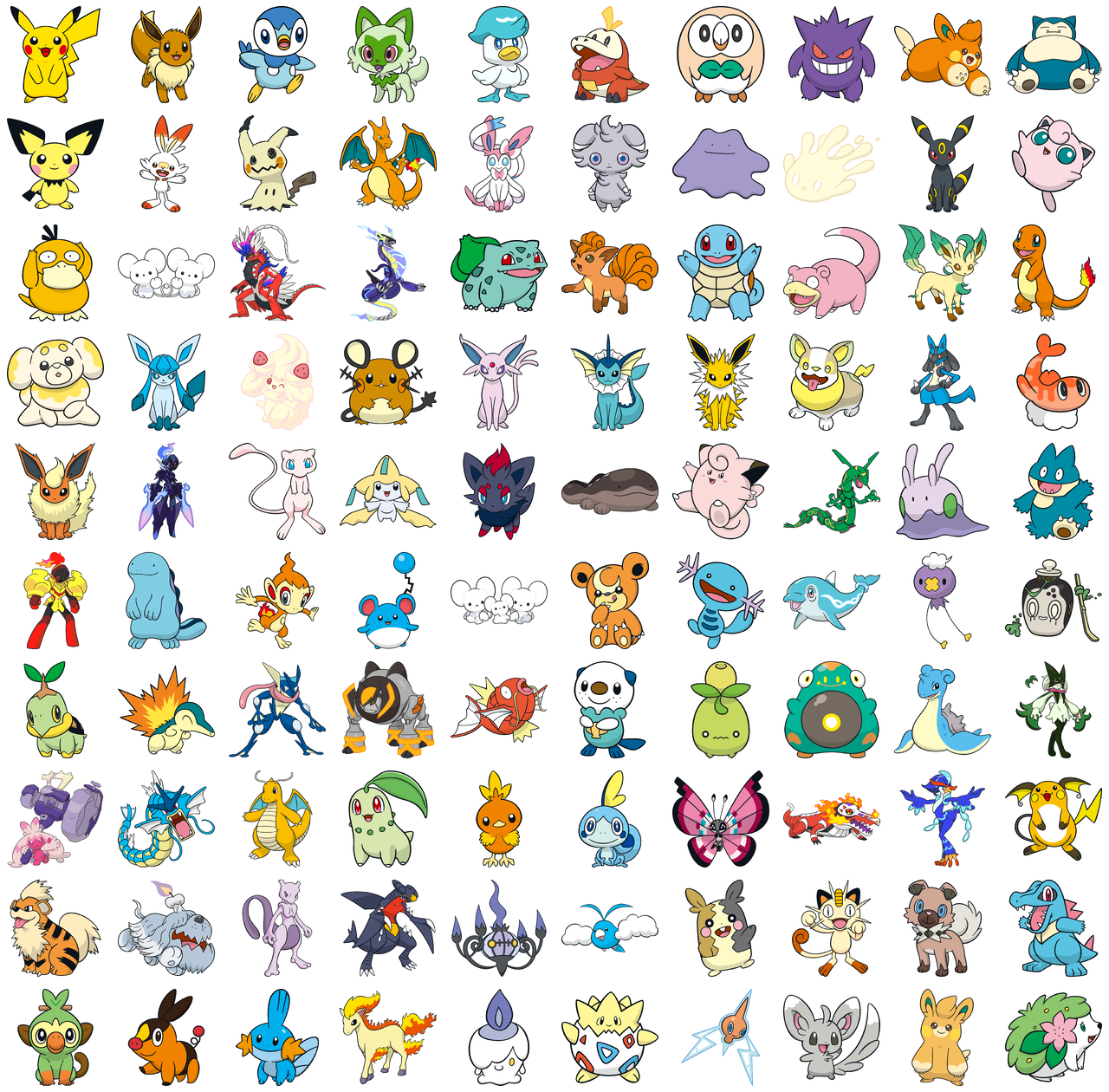
To elaborate, a quick search brought me to this thread from earlier this year, which answers the exact question, even presenting the top 100 in a simple grid (outdated by now, however).

The results were derived from the official Pokémon Center ONLINE webstore, almost certainly by means of an automated script. While the webstore is simple and utilitarian - some interesting client-side quirks notwithstanding - nothing in it immediately provided the answer to my question, so a bit of scraping and HTML parsing was required. Since the HTML is relatively easy to parse, I decided to implement this in Bash, if only because I like doing funny things with the language. (I also don’t like reaching for requests or fetch, but that’s a different topic.)
First, for any given Pokémon, we need to know how many items of merch are available:
f() {
	url=$1

	# total item count appears to be calculated client-side, and we don't
	# even have access to page count (76 for pikachu). as a workaround, go
	# to page 999 and see what page we get redirected to.
	#
	# in the browser, although an error is displayed, inspecting the contents
	# of the html shows that we really are on the last page
	pgs=$(curl -sL "${url/amp;/}&page=999" |
		grep -Pm1 'selected\>\d' || :)

	# edge case: some listed pkmn have no products (e.g. aogarasu)
	[[ -z $pgs ]] && return

	pgs=$(<<< "$pgs" cut -d'"' -f2)
	last_pg=$(curl -sL "${url/amp;/}&page=$pgs" | grep -Fc 'div class="pho"><')
	n=$(((pgs - 1) * 40 + last_pg))

	pkmn=$(<<< "$url" cut -d_ -f2)

	echo -e "$n\t$pkmn" | tee /dev/stderr # show progress in stderr
}

# f 'https://www.pokemoncenter-online.com/search/?prefn1=refCd&prefv1=P_PIKACHU'
# 3001    PIKACHU
Now to iterate over all Pokémon in the store, alphabetically. We make one to two curl calls per Pokémon, so this takes about 6 minutes on my machine:
prepend() { awk "{print \"$1\" \$0}" < /dev/stdin; }

base=https://www.pokemoncenter-online.com
consonants=("" k s t n h m y r w)
vowels=(a i u e o)

for c in "${consonants[@]}"; do
	for v in "${vowels[@]}"; do

		curl -sL "https://www.pokemoncenter-online.com/pokemon-list/?search=$c$v" |
			grep -F prefv1=P_ |
			grep -Fv '</li>' | # top pkmn are always displayed in sidebar (or something)
			cut -d'"' -f2 |
			awk '!seen[$0]++' |
			prepend "$base" |
			parallel -q f

	done
done |
	sort -u |
	sort -rn > ~/pkmn

# head pkmn
# 3001    PIKACHU
# 774     EIEVUI
# 741     POCHAMA
# 726     NYAHOJA
# 685     KUWASSU
# 676     HOGATOR
# 470     MOKUROH
# 409     GANGAR
# 370     PAMO
# 330     KABIGON
So far, so good. Finally, Pokémon Center ONLINE provides a high-quality PNG image for every Pokémon, but because each image URL is associated to a National Pokédex number (Ndex) and not a name, we need to map each Japanese name back to its Ndex. While it was tricky to find Japanese names on an English website, the ever-reliable Bulbapedia was the best canonical source I could find for this purpose. Once we have the numbers, we download all 100 images concurrently and concatenate them into a 10x10 grid with montage, part of the ImageMagick suite:
# dictionaries are for wimps
ids="$(curl -sL 'https://bulbapedia.bulbagarden.net/wiki/List_of_Japanese_Pok%C3%A9mon_names' |
	grep -Po '(#\d+$|^<td>[^<]+(\<sup|$))' | # some entries have a remark after the Japanese name
	paste -d " " - -)"

cd /tmp

# note the double <
mapfile -t imgs < <(
	< ~/pkmn head -n100 |
		while read -r l; do
			name="$(<<< "$l" cut -f2)"
			n=$(<<< "$ids" grep -Fiw "$name" |
				awk '{print $1}' |
				sed -r 's/^#0*//' |
				xargs printf "%032d")
			wget --continue -q "https://www.pokemoncenter-online.com/a/img/pokemon/$n.png" &
			echo "$n.png"
		done
)
wait

# -geometry +0+0 preserves original dimensions
montage -geometry +0+0 -tile 10x10 "${imgs[@]}" ~/pkmn.png